Introduction
Creating high-quality content consistently is rarely a creativity problem. The real bottleneck lies in research. Teams spend hours jumping between RSS feeds, Reddit threads, YouTube videos, and browser tabs, manually filtering noise, summarizing insights, and trying to keep research fresh. This fragmented, manual process is slow, error-prone, and impossible to scale as content demand grows.
This blog documents the design and implementation of an AI-powered research pipeline built using n8n, Supabase, and large language models. The system automatically collects content from RSS feeds, Reddit discussions, and YouTube transcripts, filters out irrelevant or unsafe material, classifies technical content, and generates structured AI summaries stored in a reusable database. By replacing manual research with a fully automated pipeline, this workflow transforms scattered web data into a reliable, continuously updated research engine that powers scalable, high-quality content creation.
Business Challenge
In many content-driven organizations, research is the foundation of consistent, high-quality publishing. Yet, research workflows are still largely manual. Teams rely on scattered sources such as RSS feeds, Reddit discussions, YouTube videos, and browser searches, with no unified system to collect, validate, or store insights. Writers spend significant time filtering noise, verifying relevance, and summarizing information instead of focusing on strategic content creation.
Without automation, research quickly becomes outdated, repetitive, and inconsistent. Valuable insights are lost once a post is published, there is no centralized repository of vetted information, and AI tools often produce generic outputs due to lack of structured context. This results in slower content cycles, uneven quality, and limited scalability as publishing demands grow.
To address these challenges, organizations need an automated and intelligent research pipeline that continuously collects high-signal content, filters irrelevant or unsafe data, generates structured AI summaries, and stores insights in a reusable knowledge base. Such a system enables faster content production, consistent quality, and data-driven decision-making across the entire publishing workflow.
System Architecture & Tech Stack
To solve these challenges, we designed a modular architecture where n8n serves as the central nervous system, orchestrating data flow between specialized services.
The Tech Stack
The system is built on a modular tech stack where n8n acts as the core automation engine, orchestrating API integrations, agent routing, and AI workflows. Supabase serves as the backend, with PostgreSQL storing structured research data and metadata, and object storage handling generated assets. The intelligence layer is powered by a large language model, specifically the mistral-small-latest model, chosen for its balance of speed, cost efficiency, and reasoning capability. A custom frontend built with React and Next.js functions as the human control center, allowing users to interact with the system through n8n webhooks.
In simple terms, n8n is a visual automation tool, RSS feeds automatically deliver new content from websites, APIs allow systems to communicate, Supabase manages databases and file storage, LLMs analyze and generate text, and a workflow is a sequence of automated steps that run without manual intervention.
Steps to Achieve the Requirement
The implementation is broken down into seven distinct, sequential phases. Each phase builds upon the previous one to create a complete system.
- Configure n8n, Supabase, and API Integrations
1.1 Install and Access n8n
1.2 Configure Supabase Project and Database
1.3 Configure RSS API Integration
1.4 Configure Reddit API Integration
1.5 Configure YouTube Data API Integration - Trigger Daily Research Collection Workflow
2.1 Configure Schedule Trigger - Fetch Research Data from Multiple Sources
3.1 RSS Feed Research Collection
3.2 Reddit Discussion Collection
3.3 YouTube Video and Transcript Collection - Processing Path A Research Cleaning & Classification
4.1 Merge All Research Sources
4.2 Old Content Filter
4.3 Unsafe Content Filter
4.4 AI-Based Tech Classification
4.5 Empty Content Filter - Store Research Snippets in Supabase
- Final Output Generation
- Setup Checklist and Test the Workflow
7.1 Validate n8n Configuration
7.2 Validate API Integrations
7.3 Validate AI Processing
7.4 Execute End-to-End Workflow Test
1.Configure n8n, Supabase, and API Integrations
This stage prepares the automation environment required to run the research engine.
1.1.To Install and Access n8n
1.1.1. You can use n8n in different ways: Self-hosted: Install on your local machine or server. Cloud version: Sign up for n8n Cloud to get started quickly.
1.1.2. Refer to the installation document ( https://docs.n8n.io/ ) to install Node.js and setup n8n.
1.1.3. Run npm, install n8n -g to install n8n globally.
1.1.4. Start n8n by running the n8n command in your terminal.
1.2. Configure Supabase Project.
1.2.1 Steps for creating Supabase Project
1.2.1.1. Go to Supabase Dashboard
1.2.1.2. Create a new project
1.2.2 Create Research Table
The research data will be stored in the following table:
create table public.ref_article (
id uuid not null default gen_random_uuid (),
  user_id uuid null,
  title text null,
  summary text null,
  url text null,
  date timestamp with time zone null,
  category text not null,
  source text not null,
  relevance numeric null,
  tag text null,
  inserted_at timestamp with time zone null default now(),
  constraint ref_article_pkey primary key (id)
);
1.3 Configure RSS API Credentials in n8n
1.3.1 Explanation of RSS Feed node
RSS Read
This node ingests articles from high-quality industry blogs such as TechCrunch and selected Substack newsletters. It is configured with a list of RSS feed URLs as input and automatically fetches the latest items from each source. A Merge node is applied downstream to de-duplicate articles based on their link URL, ensuring the same article is not reprocessed multiple times.
1.3.2. RSS Node Setup Steps
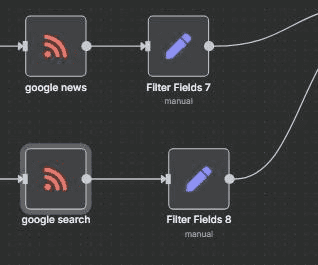
An RSS feed is a link that automatically provides the newest articles from a blog. Add RSS Read Node
1.3.2.1 Open your n8n workflow
1.3.2.2. Click the + button to add a new node
1.3.2.3. Search for “RSS Read”
1.3.2.4. Click “Add Node”
1.3.2.5. The node will appear on your canvas
1.3.3. Open the RSS Node
1.3.3.1. Click the RSS node
1.3.3.2. The configuration panel will open on the right side

1.3.4.Insert RSS Feed URLs
1.3.4.1. In the field called “Feed URLs”, paste one or more RSS links.
Example high-quality RSS URLs:
- https://techcrunch.com/feed/
- https://www.theverge.com/rss/index.xml
- https://feeds.feedburner.com/thenextweb
- https://substack.com/feed/ai-today
- https://javascriptweekly.com/rss
1.4. Configure Reddit API Credentials in n8n
1.4.1. Reddit Node n8n
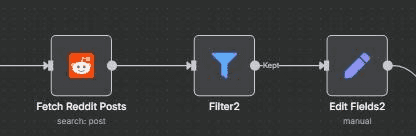
Node Type: HTTP Request. This node is used to gauge what questions real people are asking and to understand current sentiment. The request uses the GET method and calls the endpoint https://www.reddit.com/r/\[subreddit]/top.json?t=day&limit=5. No authentication is required for public read-only access. The output extracts the title and selftext of the top posts, which are later used to analyze trending topics and user intent.
1.4.2. Reddit Node Setup Steps
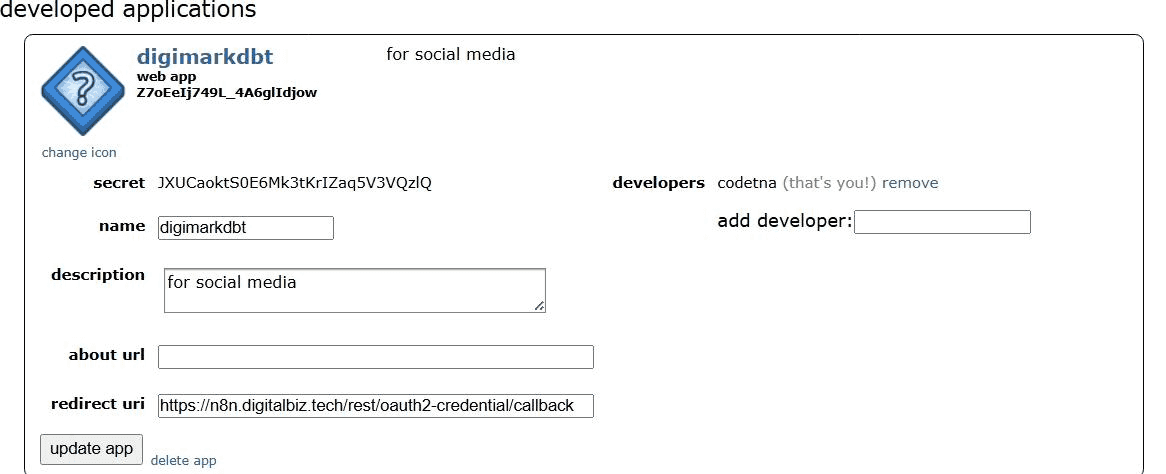
1.4.2.1: Create Reddit App
Go to https://www.reddit.com/prefs/apps and click “create another app”. Fill in the form by setting the Name todigimarkdbt, the Type toweb app, and the Redirect URI to https://n8n.digitalbiz.tech/rest/oauth2-credential/callbac. After creating the app, copy the personal use script (client_id) and the secret (client_secret), as these credentials will be required for configuring Reddit OAuth in n8n.
1.4.2.2: Create Reddit OAuth2 Credential in n8n
Go to n8n → Settings → Credentials → Add Credential and select Reddit OAuth2 API. Fill in the required details by providing the Client ID (your personal use script) and Client Secret, set the Access Token URL to https://www.reddit.com/api/v1/access_token, the Auth URL to https://www.reddit.com/api/v1/authorize, the Redirect URI to http://localhost, and the Scope to read. Once completed, click “Connect OAuth2” and approve the login to finalize the credential setup.
1.4.2.3: Add and Configure Reddit Node

Add a new node and search for “Reddit”, then configure it by setting the Resource to Post, the Operation to Search, and selecting your Reddit OAuth2 credential. Next, fill in the parameters by choosing the Location (subreddit) as artificial (or any relevant subreddit), setting the Keyword to agents (or any target term), the Limit to 40, and the Sort option to Hot to retrieve currently trending discussions.tt
1.4.2.4: Run and Use Output
Click “Execute Step” to run the node and generate output. The resulting fields include title, selftext, permalink, url, and score. Optionally, add a Set node to construct a complete Reddit URL using full_url = https://www.reddit.com{{$json.permalink}}. The processed data can then be sent to your summarizer, stored in Supabase, or forwarded into the main Research Engine workflow for further analysis.
1.5. Configure YouTube API Credentials in n8n
1.5.1 YouTube Node n8n
Node Type: HTTP Request (YouTube Data API). This node is used to find trending YouTube videos and extract their content. For each video ID retrieved, a dedicated sub-workflow is triggered to fetch the video transcript, converting rich media content into clean, processable text data suitable for downstream summarization and storage.
1.5.2. YouTube Node Setup Steps
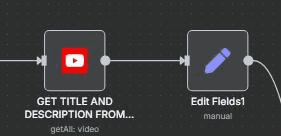
1.5.2.1: Create YouTube Data API Key
Go to https://console.cloud.google.com and create a new project or select an existing one. Navigate to APIs & Services → Library, enable YouTube Data API v3, then go to Credentials and click Create Credentials → API Key. Once generated, copy the API key, as it will be required to configure the YouTube integration in n8n.
1.5.2.2: Connect Your YouTube OAuth2 Credential
Click the YouTube node
On the right panel, select your credential under YouTube OAuth2 API
If unavailable, create one using your Google OAuth client ID and secret
1.5.2.3: Configure the Node
Configure the YouTube node by setting the Resource to video and the Limit to 50. Under Filters, set publishedAfter to {{ new Date(Date.now() - 2 24 60 60 1000).toISOString() }} to fetch recently published content, provide the search query using q = {{ $json.keyword }}, and set regionCode to US. Under Options, configure order as relevance and safeSearch as moderate to prioritize relevant and appropriate results.
1.5.2.4: Execute and Use Output
Click Execute Node to run the workflow. The output includes snippet.title, snippet.description, snippet.channelTitle, and videoId. This data can then be forwarded to your summarizer or stored in Supabase for downstream processing and analysis.
2. Trigger Daily Research Collection Workflow
2.1 Configure Schedule Trigger
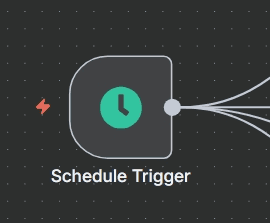
2.1.1.This workflow runs automatically once activated.
2.1.2. Manual testing is supported using the Execute Workflow button.
2.1.3. Trigger interval is set to 1 day.
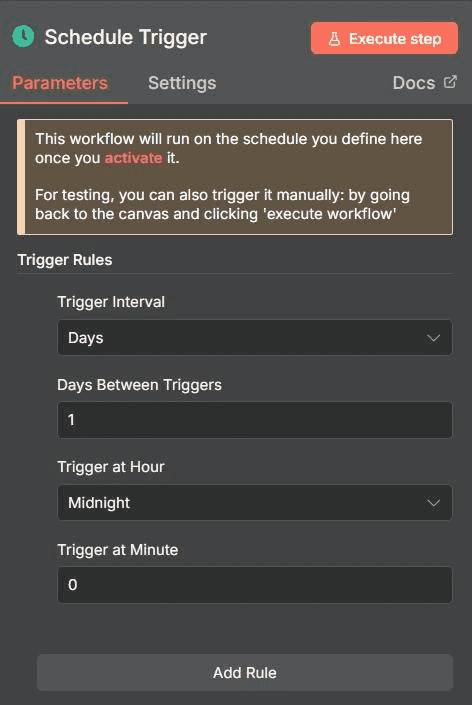
2.1.4.The workflow executes once every 24 hours.
Time: 12:00
(Runs every night before the team starts)
2.1.5. Execution time is scheduled during the night to utilize off-peak system load.
Purpose:
Ensures the system is consistently fed with fresh research data automatically.
3. Fetch Research Data from Multiple Sources
This stage automatically collects research content from multiple external sources, including RSS feeds, Reddit discussions, and YouTube videos. It ensures that only fresh, high-signal, and trending content enters the research pipeline for further filtering and summarization.
3.1. Data Source 1 — Niche Industry Blogs (RSS)
This node automatically pulls the latest articles from high-quality industry blogs and newsletters using RSS feeds. It ensures that only newly published and well-structured blog content is fetched for research processing.
3.1.1. This node uses the RSS Read node to fetch articles automatically from predefined feed URLs.
3.1.2. The selected resource is set to RSS Feed for continuous content ingestion.
3.1.3. The operation used is Read to retrieve new feed items at every workflow run.
3.1.4. Thve Feed URLs field contains multiple trusted industry blog links.
3.1.5. The node automatically fetches the latest published articles from each configured source.
3.1.6. A Merge node is later used to remove duplicate articles based on the source URL.
3.1.7. The output fields include Title, Description, Publish Date, and Source URL for each article.
3.2. Data Source 2 — Reddit
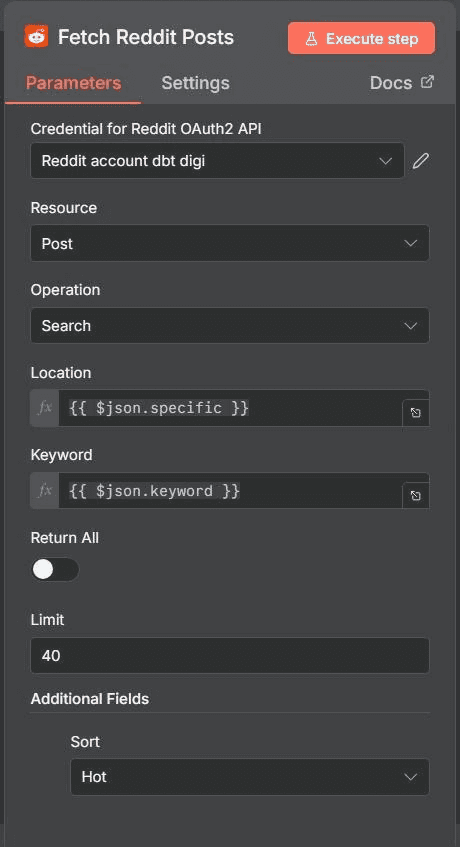
This node retrieves trending discussions and questions from selected Reddit subreddits. It helps capture real-world user sentiment, pain points, and trending technical discussions.
3 .2.1. This node uses the Reddit Search or HTTP Request node to fetch public Reddit posts.
3.2.2. The selected resource type is set to Post.
3.2.3. The operation used is Search to find posts based on defined keywords.
3.2.4. The Location (Subreddit) field specifies the target subreddit such as artificial.
3.2.5. The Keyword field is used to filter posts based on topic relevance such as agents.
3.2.6. The Sort option is set to Hot to retrieve trending discussions.
3.2.7. The Limit field is set to 40 to control the number of returned posts.
3.2.8. The output fields include Title, Selftext, URL, and Score for each post.
3.3. Data Source 3 — YouTube Transcripts
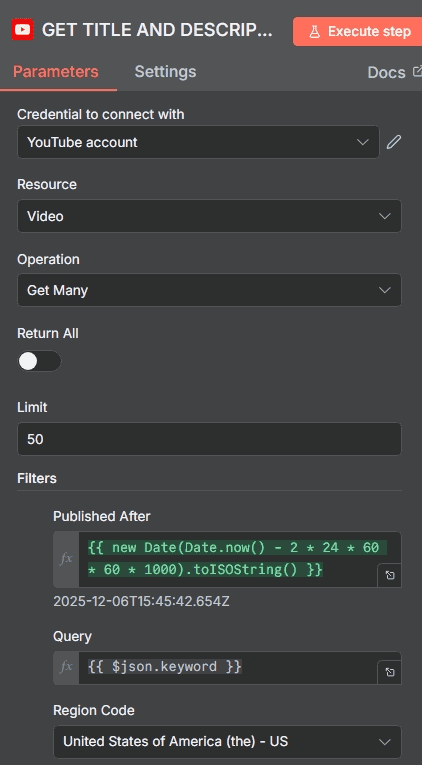
This node fetches trending YouTube video metadata and extracts their transcripts. It converts video-based knowledge into structured text for AI-based research processing.
3.3.1. This node uses the YouTube Data API through an HTTP Request or YouTube node.
3.3.2. The selected resource type is set to Video.
3.3.3. The Limit field is set to control the number of returned videos per execution.
3.3.4. The Published After filter ensures only videos from the last 48 hours are fetched.
3.3.5. The Region Code is set to US to prioritize content from a specific region.
3.3.6. The Order option is set to Relevance to fetch the most relevant videos.
3.3.7. The output fields include Title, Description, Channel Name, and Video ID.
3.3.8. A sub-workflow is triggered for each Video ID to fetch and extract the transcript.
3.3.9. The extracted transcript is converted into structured text for downstream AI summarization.
4. Processing Path A — Research Cleaning & Classification
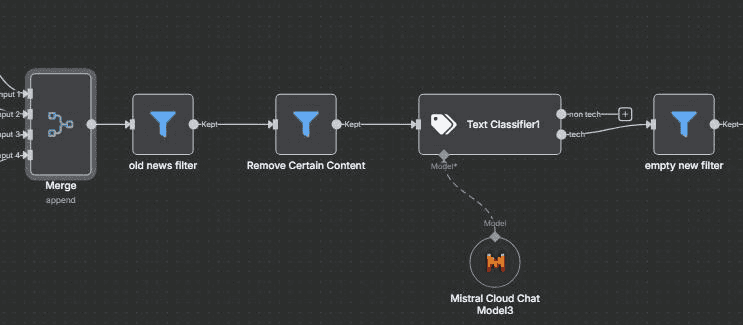
Raw data is noisy. We pass the collected text (article bodies, reddit threads, transcripts) through an AI Chain.
Node: AI Agent (Summarizer)
Prompt: "Analyze the following text. Extract the core argument, the prevailing sentiment (Positive/Negative/Neutral), and 3 key takeaways. Format this as a concise 'Research Snippet'."
Output: A structured JSON object containing source_url, summary, sentiment, and raw_text.
4.1. Workflow setup
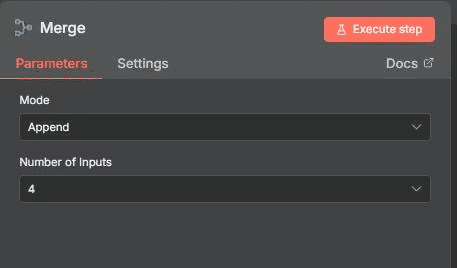
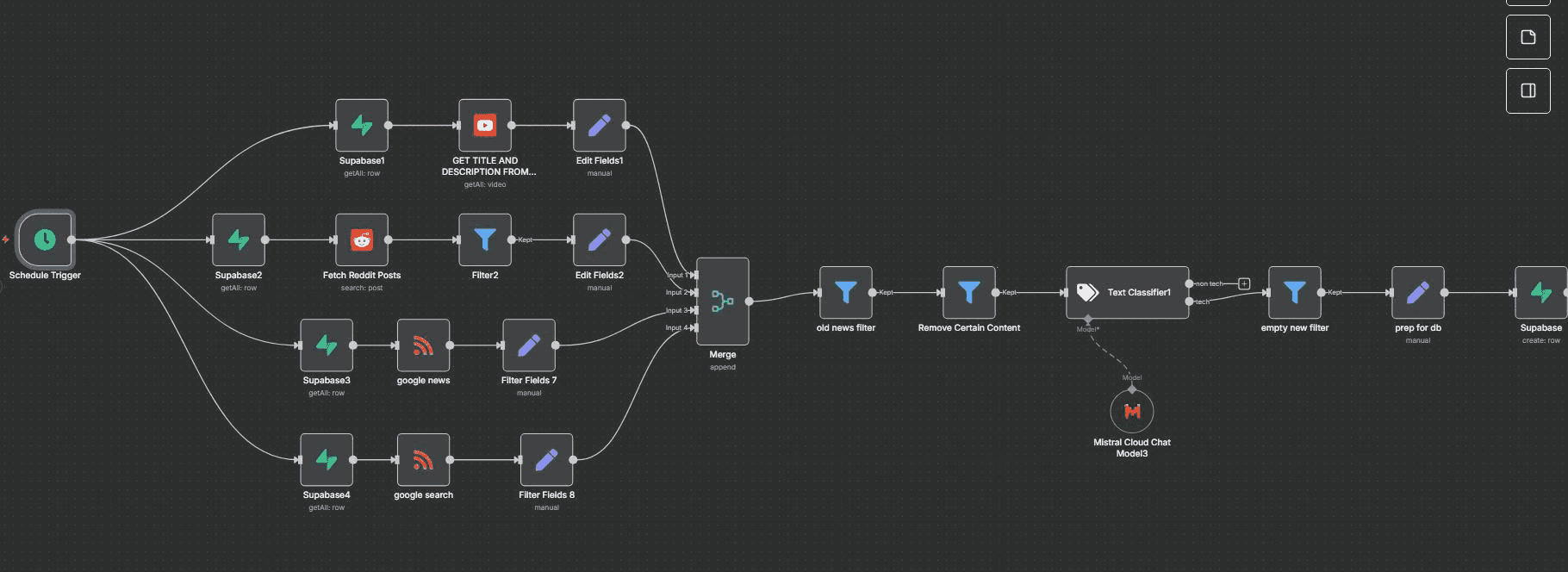
This node combines all incoming research data from multiple sources into a single unified data stream. It ensures that RSS articles, Reddit posts, and YouTube transcripts are processed together through a centralized filtering pipeline.
4.1.1. This node uses the n8n Merge node to combine multiple inputs.
4.1.2. The Number of Inputs setting is set to 4 to accept data from all connected research sources.
4.1.3. All incoming inputs are merged into one single output stream.
4.1.4. The merged output is forwarded to the filtering pipeline for further validation and cleaning.
4.2: Old news filter
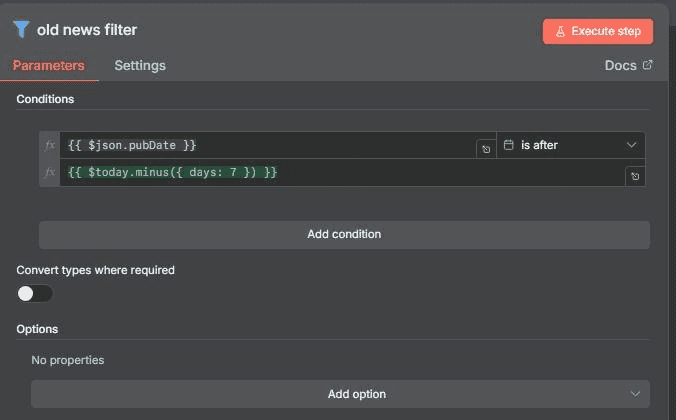
Node Type: Filter
This node is configured to remove outdated research content and retain only recent items. The condition checks whether leftValue = {{ $json.pubDate }} is dateTime after rightValue = {{ $today.minus({ days: 7 }) }}. Any content published more than 7 days ago is filtered out, ensuring that only recent, relevant items are passed forward in the workflow. The output consists exclusively of items published within the last 7 days, keeping the research pipeline fresh and high-signal for analysis and content creation.
4.2.1. This node uses the Filter node to apply date-based validation.
4.2.2. The left value is set to {{ $json.pubDate }} to read the publish date from each item.
4.2.3. The operator is set to dateTime after to validate freshness.
4.2.4. The right value is set to {{ $today.minus({ days: 7 }) }} to keep only items from the last 7 days.
4.2.5. This node removes all items older than 7 days.
4.2.6. The output contains only recent research items.
4.3: Remove Certain Content
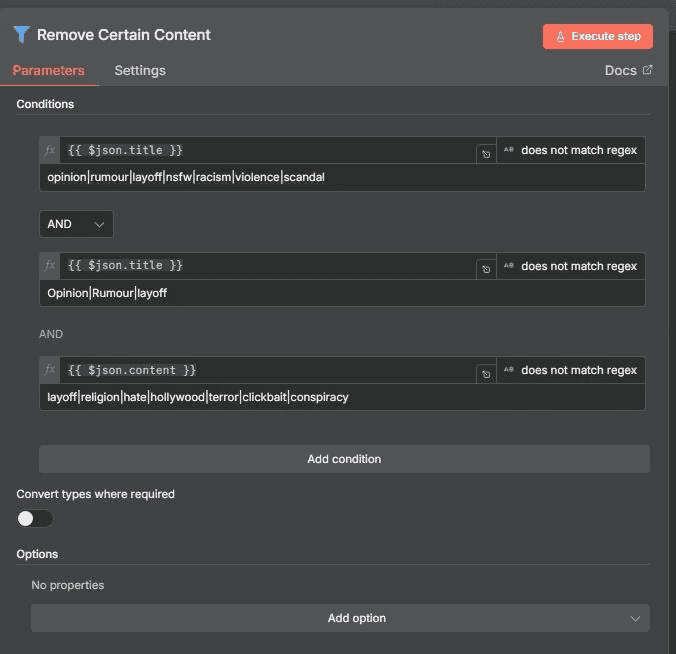
Node Type: Filter
This filter node applies multiple conditions using logical AND to block sensitive, unsafe, or irrelevant topics from entering the research pipeline. The first condition ensures the Title does not match keywords such as . This filter node applies multiple conditions using logical AND to block sensitive, unsafe, or irrelevant topics from entering the research pipeline. It performs title-level and content-level checks to exclude opinion-driven, controversial, or low-signal material. This ensures that only high-quality, relevant research content passes through, keeping the pipeline focused on actionable and reliable information. This filtering step prevents opinion-heavy, controversial, or low-signal content from passing through, ensuring the output remains focused on high-quality, relevant research material.
Output:
Safer, cleaner, non controversial content.
This node filters out unsafe, sensitive, or irrelevant content to protect brand safety and prevent unsuitable topics from entering the AI system.
4.3.1. This node uses the Filter node with multiple AND conditions.
4.3.2. The Title field is checked to ensure it does not match the keywords opinion, rumour, layoff, nsfw, racism, violence, or scandal.
4.3.3. The Content field is checked to ensure it does not match the keywords layoff, religion, hate, hollywood, terror, clickbait, or conspiracy.
4.3.4. This node blocks sensitive and controversial topics automatically.
4.3.5. The output contains only safe, neutral, and non-controversial content.
4.4 : Text Classifier
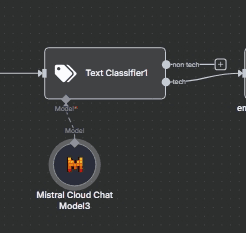
Node Type: AI Text Classifier
This node uses the mistral-small-latest model to classify content based on technical relevance. The input is provided as inputText = { $json.title }allowing the model to analyze each item’s title. Two categories are defined: non tech, which includes non-technical, entertainment, or pop culture content, and tech, which covers educational and knowledge-based technical topics. The purpose of this node is to automatically classify each item as either tech or non tech. Only items classified as tech are routed to the next node via output channel 2, ensuring that the final output contains strictly technical content suitable for further processing.
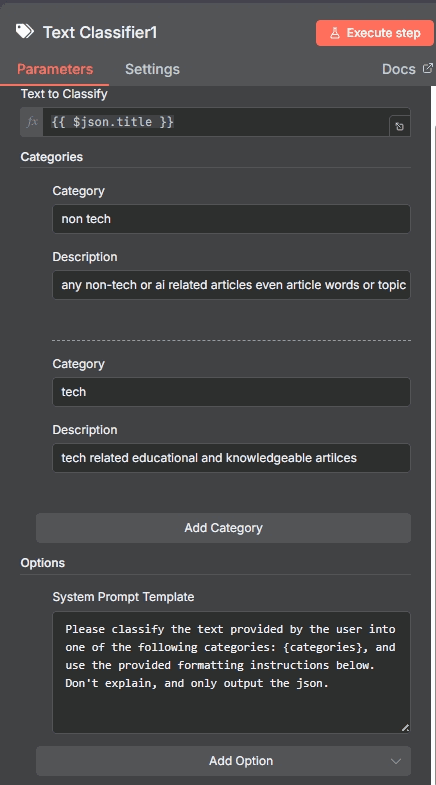
This node uses artificial intelligence to classify research content into technical and non-technical categories before summarization.
4.4.1. This node uses the LangChain Text Classifier node.
4.4.2. The selected model is set to mistral-small-latest.
4.4.3. The input text is mapped from {{ $json.title }}.
4.4.4. The classifier assigns each item into either tech or non-tech categories.
4.4.5. Only items classified as tech are forwarded to the next processing stage.
4.4.6. Non-tech items are automatically discarded.
4.5: Empty new filter
Node Type: Filter
This filter node checks whether leftValue = {{ $json.content }} exists. Its purpose is to remove items that have no article body or contain empty content, ensuring that only entries with real, usable text are passed forward. As a result, the summarizer processes only valid content, and the output consists exclusively of items that include a proper article body.
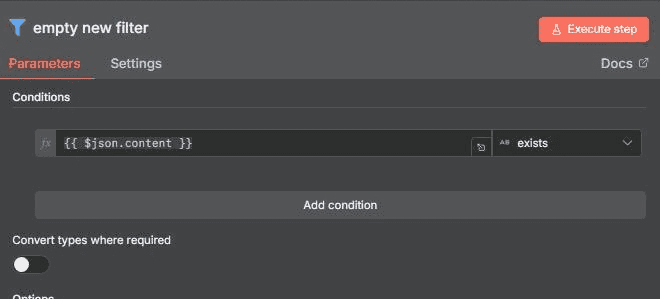
his node removes research items that do not contain any valid article body or meaningful content.
4.5.1. This node uses the Filter node to validate content existence.
4.5.2. The left value is set to {{ $json.content }}.
4.5.3. The operator is set to exists.
4.5.4. This node removes items where the article body is empty or missing.
4.5.5. The output contains only items with valid text content.
5. Store Research Snippets in Supabase
Once research is collected, it must be stored. This converts ephemeral web traffic into a proprietary asset: a database of content ideas.
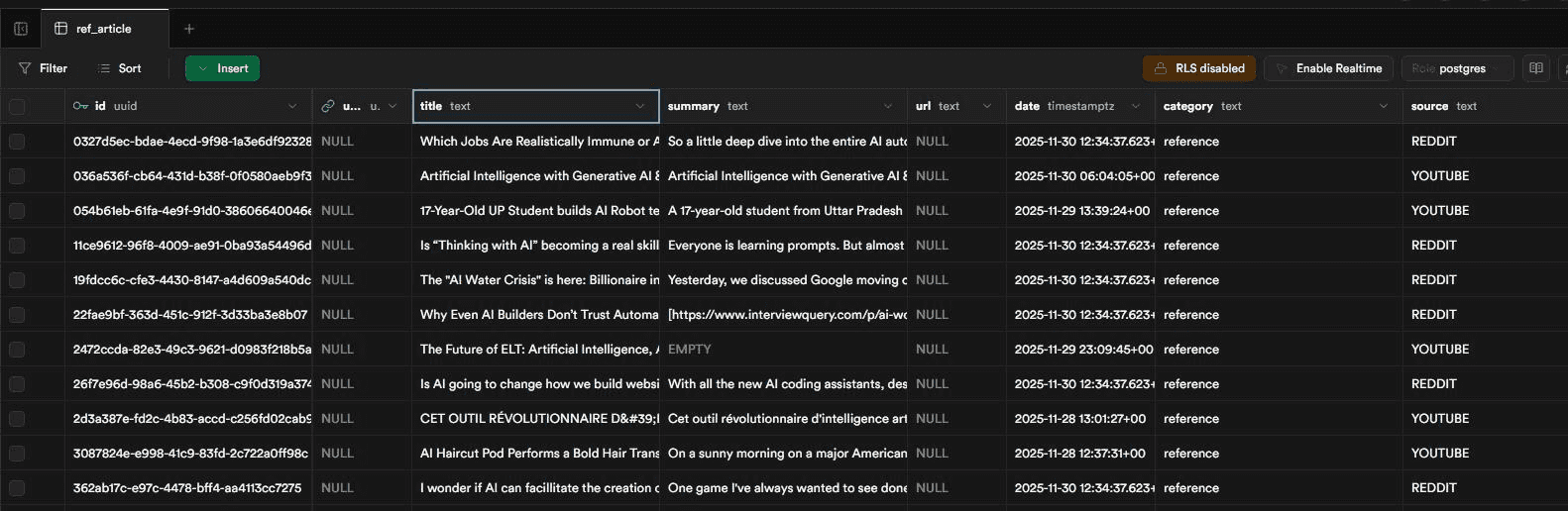
5.1. Supabase Node This node inserts the finalized AI-generated research snippets into the Supabase database for long-term storage
5.1.1. This node uses the Supabase node for database operations.
5.1.2. The selected credential is the Supabase API credential configured in n8n.
5.1.3. The selected operation is set to Insert to create new records in the database.
5.1.4. The selected schema is set to public.
5.1.5. The selected table name is set to ref_article.
5.1.6. This table stores structured research metadata including title, summary, source, category, and timestamps.
5.1.7. The unique record ID is generated automatically using the UUID function.
5.1.8. The inserted_at field is populated automatically using the current timestamp.
Table schema:
 create table public.ref_article (
  id uuid not null default gen_random_uuid (),
  user_id uuid null,
  title text null,
  summary text null,
  url text null,
  date timestamp with time zone null,
  category text not null,
  source text not null,
  relevance numeric null,
  tag text null,
  inserted_at timestamp with time zone null default now(),
  constraint ref_article_pkey primary key (id),
  constraint ref_article_user_id_fkey foreign KEY (user_id) references auth.users (id) on delete CASCADE
) TABLESPACE pg_default;
5.2 Data Mapping
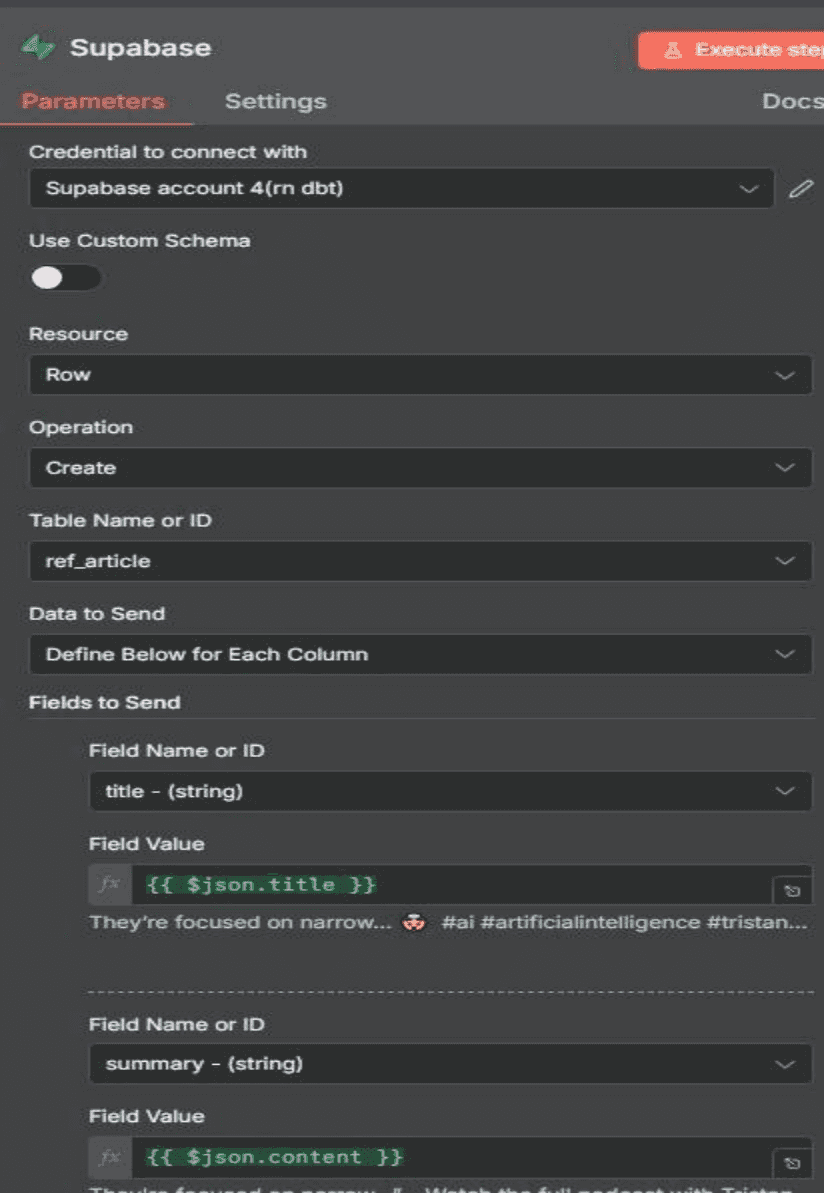
5.2.1. This step maps the structured output from the AI Summarization Agent to the corresponding columns in the Supabase database table.
5.2.2. The summary field is mapped to {{ $json.summary }} to store the AI-generated research summary.
5.2.3. The url field is mapped to {{ $json.source_url }} to store the original article or thread link.
5.2.4. The sentiment field is mapped to {{ $json.sentiment }} to store the detected tone of the content.
5.2.5. The tag field is derived dynamically from the content source such as AI, Marketing, or SaaS \ 5.2.6. The inserted_at field is mapped to {{ $now }} to record the exact time of insertion. \
6. Final Output
6.1. The final output of this workflow is a clean and structured list of recent technology articles that have passed all safety, freshness, and relevance filters.
6.2. Each output record contains a verified article title, cleaned content, and the original source URL merged from RSS, Reddit, and YouTube.
6.3. All valid research items are summarized using AI before being stored in the Supabase database.
6.4. This ensures that only high-quality, real-text, and verified technical research data is preserved for downstream content generation.
7. Setup Checklist and Test the Workflow
7.1. Configure n8n to ensure the workflow canvas, trigger nodes, and execution environment are correctly initialized.
7.2. Configure Supabase credentials and verify that the research storage table is accessible and accepts insert operations.
7.3. Configure the Reddit API by generating OAuth credentials and validating successful data extraction from selected subreddits.
7.4. Configure the YouTube Data API by enabling the API service, generating a valid API key, and confirming video data retrieval.
Conclusion:
This workflow fully automates the collection and cleaning of articles from RSS, Reddit, and YouTube. It merges all sources, removes unsafe or irrelevant topics, filters old content, and keeps only fresh, high quality tech items with real text. The result is a reliable, ready to use research feed that powers your AI summarizer and content engine with consistent, accurate, and relevant information than saves final output in supabase.
Leave a Comment